This page describes how you can use Google Cloud Armor security policies to protect
your Google Cloud deployments.
Cloud Armor security policies are collections of Cloud Armor rules
that are applied to requests destined for a protected resource in the order
configured by the policy.
Google Cloud Armor security policies help protect your application by providing Layer 7 filtering and by scrubbing incoming requests for common web attacks or other Layer 7 attributes to potentially block traffic before it reaches your load-balanced backend services or backend buckets. Each security policy is made up of a set of rules that can be configured on attributes from Layer 3 through Layer 7. The rules can filter traffic based on conditions such as an incoming request's IP address, IP range, region code, or request headers.
Cloud Armor security policies are available for the following load
balancer and endpoint types:
- All external Application Load Balancers, including classic Application Load Balancers
- Regional internal Application Load Balancer
- Global external proxy Network Load Balancer (TCP/SSL)
- Classic proxy Network Load Balancer (TCP/SSL)
- Regional external passthrough Network Load Balancer (TCP/UDP)
- External protocol forwarding
- VMs with external IPv4 addresses or external IPv6 address ranges assigned to a network interface (NIC)
The load balancer can be in [Premium Tier or Standard
Tier](https://docs.cloud.google.com/network-tiers/docs/overview).
The backends to the backend service can be any of the following:
- [Instance groups](https://docs.cloud.google.com/compute/docs/instance-groups)
- All [network endpoint group](https://docs.cloud.google.com/load-balancing/docs/negs) (NEG) types supported by your load balancer
- [Buckets](https://docs.cloud.google.com/storage/docs/buckets) in Cloud Storage
When you use Cloud Armor to protect a hybrid deployment or a multicloud
architecture, the backends must be internet NEGs or hybrid NEGs.
Cloud Armor also protects serverless NEGs when traffic is routed
through a load balancer. For information about how to route traffic through your
load balancer before it reaches your serverless NEG, see
[Ingress controls](https://docs.cloud.google.com/appengine/docs/standard/python3/application-security#ingress_controls).
Cloud Armor also provides advanced network DDoS protection for [regional external passthrough Network Load Balancers](https://docs.cloud.google.com/load-balancing/docs/network), [protocol
forwarding](https://docs.cloud.google.com/load-balancing/docs/protocol-forwarding), and VMs with public IP addresses. For more information about advanced DDoS protection, see [Configure
advanced network DDoS protection](https://docs.cloud.google.com/armor/docs/advanced-network-ddos).
## Protect your Google Cloud deployments with Cloud Armor security policies
External load balancing is implemented at the edge of Google's network in [Google's points of presence (PoPs)](https://cloud.google.com/about/locations/#network-tab) around the world. In Premium Tier, user traffic directed to an [external load
balancer](https://docs.cloud.google.com/load-balancing/docs/choosing-load-balancer#external-internal) enters the PoP closest to the user. It is then load balanced over Google's global network to the closest backend that has sufficient capacity available. In Standard Tier, user traffic enters Google's network through peering, ISP, or transit networks in the region where you have deployed your Google Cloud resources.
Cloud Armor security policies enable you to allow, deny, rate-limit, or
redirect requests to your backend services at the Google Cloud edge, as
close as possible to the source of incoming traffic. This prevents unwelcome
traffic from consuming resources or entering your Virtual Private Cloud (VPC)
networks.
The following diagram shows the location of global external Application Load Balancers, classic Application Load Balancers, the Google network, and Google data centers.
[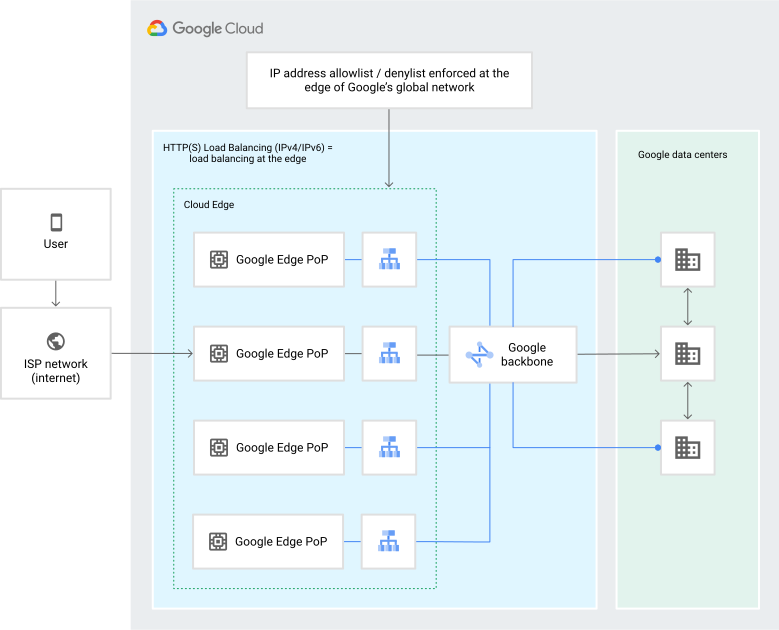](https://docs.cloud.google.com/static/armor/images/ip-bl-wl-1.svg) Cloud Armor policy at network edge (click to enlarge).
## Requirements
These are the requirements for using Cloud Armor security policies:
- The backend service's load balancing scheme must be `EXTERNAL`, `EXTERNAL_MANAGED`, or `INTERNAL_MANAGED`.
- The backend service's protocol must be one of `HTTP`, `HTTPS`, `HTTP/2`, `UDP`, `TCP`, `SSL`, or `UNSPECIFIED`.
## About Cloud Armor security policies
Cloud Armor security policies are sets of rules that match on
attributes from Layer 3 to Layer 7 networks to protect externally facing applications or
services. Each rule is evaluated with respect to incoming traffic.
A Cloud Armor security policy *rule* consists of a match condition and
an action to take when that condition is met. For example, a condition can be
whether the incoming traffic's client IP address matches a specific IP address
or CIDR range (also known as IP address allowlist and denylist rules).
Alternatively, by using the
[Cloud Armor custom rules language reference](https://docs.cloud.google.com/armor/docs/create-security-policy-rules),
you can create custom conditions that match on various attributes of the
incoming traffic, such as the URL path, request method, or request header values.
When an incoming request matches a condition in a security policy rule,
Cloud Armor allows, denies, or redirects the request, based on whether
the rule is an allow rule, a deny rule, or a redirect rule.
There can be additional action parameters to apply, like inserting request
headers; this feature is part of Cloud Armor bot management. For more
information about bot management, see the [bot management
overview](https://docs.cloud.google.com/armor/docs/bot-management).
Cloud Armor provides two categories of security policies:
hierarchical security policies and service-level security policies. Hierarchical security policies
are attached at the organization, folder, or project level, while service-level
security policies are associated with one or more backend services. For more
information about hierarchical security policies, see
[Hierarchical security policies overview](https://docs.cloud.google.com/armor/docs/hierarchical-policies-overview).
A backend service can have two service-level security policies associated
with it at the same time, but it can't have two backend security policies or two
edge security policies at the same time. However, your backend services don't
all need to be associated with the same security policies. To attach and remove
security policies from supported backend services and features, see
[Attach and remove security policies](https://docs.cloud.google.com/armor/docs/manage-security-policies#attach_and_remove_security_policies).
If a Cloud Armor security policy is associated with
any backend service, it can't be deleted. A backend service can be deleted
regardless of whether it has an associated security policy.
If multiple forwarding rules point to a backend service that has an associated
security policy, the policy rules are enforced for all traffic coming in to each
of the forwarding rule IP addresses.
In the following diagram, the Cloud Armor security policy
`internal-users-policy` is associated with the backend service `test-network`.
[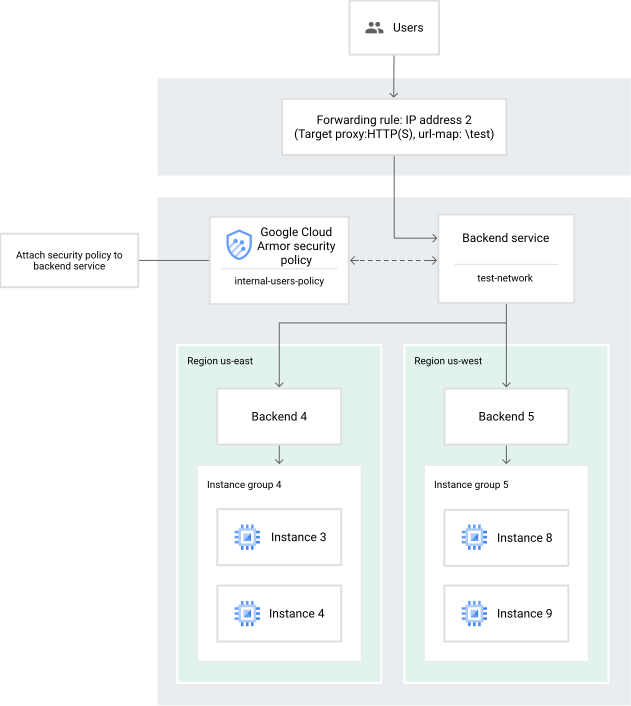](https://docs.cloud.google.com/static/armor/images/ip-bl-wl-8.svg) Cloud Armor security policy at network edge (click to enlarge). Cloud Armor security policies have the following features:
- You can optionally use the `QUIC` protocol with load balancers that use
Cloud Armor.
- You can use Cloud Armor with load balancers that are in either of
the following Network Service Tiers:
- Premium Tier
- Standard Tier
- You can use backend security policies with GKE and the
default ingress controller.
- You can use a default security policy that throttles traffic over a
user-specified threshold when you configure one of the following load
balancers:
- Global external Application Load Balancer
- Classic Application Load Balancer
- Regional external Application Load Balancer
- Regional internal Application Load Balancer
- Global external proxy Network Load Balancer (TCP/SSL)
- Classic proxy Network Load Balancer (TCP/SSL)
In addition, you can configure Cloud Armor preconfigured WAF rules, which are complex
web application firewall (WAF) rules with dozens of *signatures* that are
compiled from open source industry standards. Each signature corresponds to an
attack detection rule in the rule set. Google offers these rules as is. The
rules allow Cloud Armor to evaluate dozens of distinct traffic
signatures by referring to conveniently named rules, rather than requiring you
to define each signature manually. For more information about preconfigured WAF rules, see
the [preconfigured WAF rules overview](https://docs.cloud.google.com/armor/docs/waf-rules).
### Types of security policies
> [!CAUTION]
> **Caution:** Hierarchical security policies support only some security policy types and don't have the same features as service-level security policies. For more information about which features hierarchical security policies support, see the Hierarchical security policies [features table](https://docs.cloud.google.com/armor/docs/hierarchical-policies-overview#features).
The following tables show the types of service-level security policies and what
you can do with them. A
check mark (Yes)
indicates that the type of security policy supports the feature.
#### Globally scoped security policies
| Feature | Backend security policy || Edge security policy | Internal service security policy |
|---|---|---|---|---|
| Frontend type | - Global external Application Load Balancer - Classic Application Load Balancer (global only) | - Global external proxy Network Load Balancer - Classic proxy Network Load Balancer | - Global external Application Load Balancer - Classic Application Load Balancer (global only) - Global external proxy Network Load Balancer - Classic proxy Network Load Balancer | [Cloud Service Mesh clients](https://docs.cloud.google.com/service-mesh/docs/supported-platforms) |
| Attachment point (protected resource) | Backend service | Backend service | - Backend service - Backend bucket | Cloud Service Mesh endpoint policy |
| Rule actions | - Allow - Deny - Redirect (`GOOGLE_RECAPTCHA` and `EXTERNAL_302`) - Throttle - Rate-based ban | - Allow - Deny - Throttle - Rate-based ban | - Allow - Deny | - Fairshare |
| Client IP address | Yes | Yes | Yes | |
| Client geography | Yes | Yes | Yes | |
| Client ASN | Yes | Yes | YesMedia CDN only | |
| Rate limiting | Yes | Yes | | Yes |
| TLS fingerprinting (JA3 and JA4) | Yes | Yes | | |
| Bot management | Yes | | | |
| HTTP filtering | Yes | | YesMedia CDN only | Yes |
| Body filtering | Yes | | | |
| WAF | Yes | | | |
| Managed rules | Yes | | | |
| Adaptive Protection | Yes | | | |
| Address Group | Yes | Yes | | |
| Google Threat Intelligence | Yes | Yes | YesMedia CDN only | |
| Security Command Center | Yes | Yes | Yes | |
| Cloud Monitoring | Yes | Yes | Yes | |
| Request logging | Yes | Yes | Yes | |
#### Regionally scoped security policies
| Feature | Regional backend security policy || Network edge security policy |
|---|---|---|---|
| Frontend type | - Regional external Application Load Balancer | - Regional internal Application Load Balancer | - Regional external passthrough Network Load Balancer - External protocol forwarding - VMs with NICs that have external IP addresses |
| Attachment point (protected resource) | Backend service (regional) | Backend service (regional) | - Target pool - Target instance - Backend service (regional) - Instance |
| Rule actions | - Allow - Deny - Throttle - Rate-based ban | - Allow - Deny - Throttle - Rate-based ban | - Allow - Deny |
| Client IP address | Yes | Yes | Yes |
| Client geography | Yes | | Yes |
| Client ASN | Yes | | Yes |
| Rate limiting | Yes | Yes | |
| TLS fingerprinting (JA3 and JA4) | YesJA3 only | YesJA3 only | |
| Bot management | | | |
| HTTP filtering | Yes | Yes | |
| Body filtering | Yes | Yes | |
| WAF | Yes | Yes | |
| Managed rules | Yes | Yes | |
| Adaptive Protection | | | |
| Address Group | | | |
| Google Threat Intelligence | | | |
| Byte offset filtering | | | Yes |
| Security Command Center | | | |
| Cloud Monitoring | Yes | Yes | |
| Request logging | Yes | Yes | |
#### Backend security policies
Backend security policies are used with backend services exposed by the following load balancer types:
- Global external Application Load Balancer
- Classic Application Load Balancer
- Regional external Application Load Balancer
- Regional internal Application Load Balancer
- Global external proxy Network Load Balancer
- Classic proxy Network Load Balancer
You use backend security policies to filter requests and protect backend services that reference
instance groups or any of the supported NEG types behind the previously listed
load balancer types. For more information about the NEGs that your load balancer
supports, see the [Network endpoint groups overview](https://docs.cloud.google.com/load-balancing/docs/negs).
When using global external proxy Network Load Balancers or classic proxy Network Load Balancers,
Cloud Armor enforces the security policy rule `deny` action only on new
connection requests. The `deny` action terminates the TCP connection. In
addition, if you provide a status code with your `deny` action, the status code
is ignored.
Backend security policies have the optional `type` flag value `CLOUD_ARMOR`. If
you don't set the `type` flag, the default value is `CLOUD_ARMOR`.
#### Edge security policies
Edge security policies enable users to configure filtering and access control
policies for content that is stored in cache; this includes endpoints like
Cloud CDN-enabled backend services and Cloud Storage buckets. Edge
security policies support filtering based on a subset of parameters compared to
backend security policies. You cannot set an edge security policy as a backend
policy.
Edge security policies are supported for the following endpoints:
- Global external Application Load Balancer
- Classic Application Load Balancer
Edge security policies can be configured to filter requests before the request
is served from Google's cache. Edge security policies are deployed and enforced
near the outermost perimeter of Google's network, upstream of where the
Cloud CDN cache resides. Edge security policies can coexist with backend
security policies to provide two layers of protection. They can be
simultaneously applied to a backend service regardless of the resources that the
backend service points to---for example, instance groups or network endpoint
groups. Only edge security policies can be applied to backend buckets.
When edge security policies and backend security policies are attached to the
same backend service, backend security policies are enforced only for cache miss
requests that have passed edge security policies.
Edge security policies are evaluated and enforced before
Identity-Aware Proxy (IAP). A request blocked by an edge security policy is
denied before IAP evaluates the identity of the requestor.
Blocking a request with a rule at the edge security policy prevents
IAP from serving a sign-in page or otherwise attempting to
authenticate the user.
Edge security policies have the `type` flag value `CLOUD_ARMOR_EDGE`.
#### Network edge security policies
Network edge security policies let you configure rules to block traffic at the
edge of Google's network.
Enforcing network edge security policies doesn't consume VM or host resources,
which helps prevent high volume traffic from exhausting resources on the target
workload or otherwise causing a denial of service.
You can configure network edge security policies for the following
resources:
- Regional external passthrough Network Load Balancers
- Protocol forwarding
- VMs with public IP addresses
Network edge security policies support filtering based on some of the same
parameters as backend security policies, and are the only security policy type
to support [byte offset
filtering](https://docs.cloud.google.com/armor/docs/network-edge-policies#byte-offset). For a complete list
of available parameters, see the [Types of security policies](https://docs.cloud.google.com/armor/docs/security-policy-overview#policy-types)
table.
Network edge security policies have the `type` flag value `CLOUD_ARMOR_NETWORK`.
To configure network edge security policies, you must first configure advanced
network DDoS protection in the region where you intend to create the
policies. For more information about advanced DDoS protection, see [Configure
advanced network DDoS protection](https://docs.cloud.google.com/armor/docs/advanced-network-ddos).
#### Internal service security policies
Internal service security policies let you configure fairshare rate limiting
with Cloud Service Mesh. Rather than attaching an internal service
security policy to a backend service or backend bucket, you attach it to a
Cloud Service Mesh endpoint policy. To learn more about internal service
security policies, see
[Configure rate limiting with Cloud Armor](https://docs.cloud.google.com/service-mesh/docs/service-routing/rate-limiting-overview)
in the Cloud Service Mesh documentation.
### Rule evaluation order
Rule evaluation order is determined by *rule priority* , from the lowest number
to the highest number. The rule with the lowest numeric value assigned has the
highest logical priority and is evaluated prior to rules with lower logical
priorities. The minimum numeric priority is 0. The priority of a rule decreases
as its number increases (1, 2, 3, *N* +1). You cannot configure two or more rules
with the same priority. The priority for each rule must be set to a number from
0 to 2147483646 inclusive. The priority value 2147483647, also known as
`INT-MAX`, is reserved for the [default rule](https://docs.cloud.google.com/armor/docs/security-policy-overview#default-rule).
Priority numbers can have gaps. These gaps let you add or remove rules in the
future without affecting the rest of the rules. For example, 1, 2, 3, 4, 5, 9,
12, 16 is a valid series of priority numbers that you can add rules to, which are
numbered from 6 to 8, 10 to 11, and 13 to 15 in the future. You don't need to
change the existing rules except for the order of execution.
Typically, the highest priority rule that matches the request is applied.
However, an exception occurs for requests with a body when evaluating
preconfigured WAF rules (`evaluatePreconfiguredWaf`) or custom rules that
reference `request.body` or `request.params`. The exception is as follows:
For requests containing bodies, Cloud Armor receives the request's header
before the body (payload). Because Cloud Armor receives the header
information first, it evaluates rules that match against the header, but it
doesn't match any preconfigured rules on the body. If there are multiple
header-based rules, Cloud Armor evaluates them based on their priority
as expected. Note that `redirect` actions and inserting custom header actions
work only during the header processing phase. The `redirect` action, if matched
during the following body processing phase, is translated to a `deny` action.
The custom request header action, if matched during the body processing phase,
doesn't take effect.
After Cloud Armor receives the request body, it evaluates rules that
apply to both the request headers and body. As a result, it's possible that
lower priority rules that allow a request's header are matched before higher
priority rules that block the request's body. In such cases, it is possible that
the HTTP header portion of the request is sent to the target backend service,
but the body containing potentially malicious content is blocked.
Cloud Armor inspects up to the first 64 kB of the request body,
according to the [configured inspection limit](https://docs.cloud.google.com/armor/docs/security-policy-overview#request-body).
Only preconfigured WAF rules (`evaluatePreconfiguredWaf()`) and custom rules that
reference `request.body` or `request.params` are evaluated against the request
body. All other expressions are evaluated only against the request header. The
body inspection is limited to the configured inspection limit of the request
body. By default,
the body is decoded like URL query parameters. Cloud Armor
also supports parsing JSON-formatted bodies (`Content-Type =
"application/json"`). However, Cloud Armor doesn't support other HTTP
Content-Type/Content-Encoding-based decoders such as XML, Gzip, or UTF-16. For
other content types and encoding types, including multipart/form-data,
Cloud Armor doesn't decode the data, but applies the preconfigured
rules to raw data.
#### Examples
In the following example, rules 1, 2, and 3 are evaluated in that order for the
`IP` and `HTTP` header fields. However, if an IP address 9.9.9.1 launches an XSS
attack in the body, only the body is blocked (by rule 2); the `HTTP`
header passes through to the backend (by rule 3).
```
Rule1
expr: inIPRange(origin.ip, '10.10.10.0/24')
action: deny(403)
priority: 1
Rule2
expr: evaluatePreconfiguredWaf('xss-v422-stable')
action: deny(403)
priority: 2
Rule3
expr: inIPRange(origin.ip, '9.9.9.0/24')
action: allow
priority: 3
Rule-default
action: deny(403)
priority: INT-MAX
```
In the following example, the policy allows `IP 9.9.9.1` without scanning
against XSS attacks:
```
Rule1
expr: inIPRange(origin.ip, '10.10.10.0/24')
action: deny(403)
priority: 1
Rule2
expr: inIPRange(origin.ip, '9.9.9.0/24')
action: allow
priority: 2
Rule3
expr: evaluatePreconfiguredWaf('xss-v422-stable')
action: deny(403)
priority: 3
Rule-default
action: allow
priority: INT-MAX
```
### Default rule
Each Cloud Armor security policy contains a *default* rule that is
matched if none of the higher priority rules are matched or if there are no
other rules in the policy. The default rule is automatically assigned a priority
of 2147483647 (`INT-MAX`), and it is always present in the security policy.
You can't delete the default rule, but you can modify it. The default action
for the default rule is `deny`, but you can change the action to `allow`.
### Fingerprint
Each Cloud Armor security policy has a field `fingerprint`. The
fingerprint is a hash of the contents stored in the policy. When you create a
new policy, don't provide the value of this field. If you provide a value, it is
ignored. However, when you update a security policy, you must specify the
current fingerprint, which you get when you export or describe the policy (using
`EXPORT` or `DESCRIBE`, respectively).
The fingerprint protects you from overriding another user's update. If the
fingerprint that you provide is out of date, it means that the security policy
was updated since you last retrieved the fingerprint. To check for any
differences and to retrieve the latest fingerprint, run the `DESCRIBE` command.
### Rules language and enforcement engine
The rules language and enforcement engine provide the following:
- The ability to write custom rule expressions that can match on various Layer
3 through Layer 7 attributes of incoming requests. Cloud Armor
provides a [custom rules language
attributes](https://docs.cloud.google.com/armor/docs/create-security-policy-rules) for writing custom match
conditions.
- The ability to combine up to 5 subexpressions in a single rule.
- The ability to deny or allow requests based on the incoming request's region
code. The region codes are based on the [ISO 3166-1 alpha
2](https://www.wikipedia.org/wiki/ISO_3166-1_alpha-2)
codes. The region codes sometimes correspond to specific countries, but some
encompass a country plus its associated areas. For example, the `US` code
includes all states of the United States, one district, and six outlying
areas.
### Types of rules
Cloud Armor has the following types of rules.
> [!NOTE]
> **Note:** Edge security policies support filtering based on only `origin.asn`, `origin.ip`, `origin.region_code`, `request.headers`,`request.method`,`request.path`, `request.query`, and `request.scheme`.
#### IP address allowlist and denylist rules
You can create IP address allowlist and denylist rules within a security policy.
Some examples include the following:
- Adding an IP address or [CIDR](https://wikipedia.org/wiki/Classless_Inter-Domain_Routing)
range to a denylist lets you block a client IP address or CIDR range
from accessing supported load balancers.
- Adding an IP address or CIDR range to an allowlist lets you allow a client
IP address or CIDR range to access supported load balancers.
- IPv4 and IPv6 addresses are supported in allowlist and denylist rules.
- Deny rules can return an HTTP `403 Unauthorized`, `404 Access Denied`,
or `502 Bad Gateway` status code.
- Exceed action rules can return an HTTP `429 Too Many Requests` status code.
#### Client geography rules
You can allow or deny requests that originated from selected geographical areas
that are defined by the Unicode country code.
Cloud Armor uses our own IP geolocation database to identify the
request geography location. The database is updated regularly. While we can't
guarantee a particular update cadence, during normal operations the mappings
that Cloud Armor uses are updated about once per week.
Updated mappings must be propagated to Google's infrastructure globally. The
rollout process happens gradually, usually over several days, across multiple
zones and regions that Cloud Armor is deployed on. Because of this
gradual rollout process, it's possible to see requests from the same client IP
address being handled inconsistently during a rollout when the geolocation
mapping for the client IP address has changed.
#### Preconfigured WAF rules
Cloud Armor provides a comprehensive list of preconfigured WAF rules
based on the [OWASP Core Rule Set
(CRS)](https://github.com/coreruleset/coreruleset/)
to help you detect the following:
- SQL injection attacks
- Cross-site scripting attacks
- Local file inclusion attacks
- Remote file inclusion attacks
- Remote code execution attacks
- Method enforcement attacks
- Scanner detection attacks
- Protocol attacks
- PHP injection attacks
- Session fixation attacks
- Java attacks
- NodeJS attacks
For details, see the [Cloud Armor preconfigured WAF rules
overview](https://docs.cloud.google.com/armor/docs/waf-rules).
#### Managed rules
Cloud Armor managed rules are preselected threat detection groups.
These rules simplify WAF security management by providing:
- Automated updates that protect against newly discovered Common Vulnerabilities and Exposures (CVEs) and zero-day vulnerabilities.
- Flexible version pinning to bind policies to `stable` or `canary` versions.
For more information about managed rules, see [Managed rules
overview](https://docs.cloud.google.com/armor/docs/managed-rules-overview).
#### Bot management rules
You can use bot management rules to do the following:
1. Redirect requests for reCAPTCHA assessment with optional manual challenges.
2. Evaluate reCAPTCHA tokens attached with a request and apply the configured action based on token attributes.
3. Redirect requests to your configured alternative URL with a `302` status code.
4. Insert custom headers to requests before proxying them to your backends.
For more information about bot management, see the [bot management
overview](https://docs.cloud.google.com/armor/docs/bot-management).
#### Preconfigured rules for named IP address lists
Preconfigured rules for named IP address lists provide the following:
- Integrate third-party providers' named IP address lists with
Cloud Armor.
- Simplify maintenance of allowed or denied IP address ranges.
- Synchronize third-party providers' lists daily.
- Increase your capacity for configuring IP addresses and ranges in security
policies because named IP address lists aren't subject to limits on the
number of IP addresses per rule.
#### Rate limiting rules
You can use rate limiting rules to do the following:
- Throttle requests per client based on a threshold you configure.
- Temporarily ban clients that exceed a request threshold that you set for a configured duration.
When you use rate limiting with global external proxy Network Load Balancers or
classic proxy Network Load Balancers, the following restrictions apply:
- Cloud Armor only enforces rate limiting actions like throttling or banning on new connection requests from clients.
- Only the key types `ALL` and `IP` are supported.
- If you attempt to use the key type `HTTP-HEADER` or `HTTP-COOKIE` with TCP/SSL load balancers, the key type is interpreted as `ALL`, and likewise `XFF-IP` is interpreted as `IP`.
For more information about rate limiting and how it works, see the
[Rate limiting overview](https://docs.cloud.google.com/armor/docs/rate-limiting-overview).
### Preview mode
You can preview the effects of a rule without enforcing it. In preview mode,
actions are noted in [Cloud Monitoring](https://docs.cloud.google.com/monitoring/docs). You can choose to
preview individual rules in a security policy, or you can preview every rule in
the policy. You are charged the normal per-request fee for rules in preview
mode.
You can enable preview mode for a rule by using the Google Cloud CLI and the
`--preview` flag of the [`gcloud compute security-policies rules update` command](https://docs.cloud.google.com/sdk/gcloud/reference/compute/security-policies/rules/update).
To disable preview mode, use the `--no-preview` flag. You can also use the
Google Cloud console.
If a request triggers a preview, Cloud Armor continues to evaluate
other rules until finding a match. Both the matched and preview rule are
available in the logs.
### Custom error responses
When you use a global external Application Load Balancer, you can configure custom error responses
for HTTP status codes for errors that load balancers or backend instances
generate. In addition, you can configure custom error codes for traffic that
Cloud Armor denies by configuring custom response pages for the same
`4*xx*` series or `5*xx*` series status codes
that your existing security policy rules use.
For more information about custom error responses, see the [Custom error response overview](https://docs.cloud.google.com/load-balancing/docs/https/custom-error-response). For
configuration steps, see [Configure custom error responses](https://docs.cloud.google.com/load-balancing/docs/https/configure-custom-error-responses).
### Logging
Cloud Armor has extensive logging and lets you define how verbose your
logging is. Cloud Armor logs are generated based on the first (highest
priority) rule that matches an incoming request, whether or not the security
policy is in preview mode. This means that logs aren't generated for
non-matching rules, nor for matching rules at lower priorities.
For complete information about logging, see [Use request
logging](https://docs.cloud.google.com/armor/docs/request-logging). For more information about verbose
logging, see [Verbose logging](https://docs.cloud.google.com/armor/docs/verbose-logging). To view
Cloud Armor logs, see [Viewing
logs](https://docs.cloud.google.com/armor/docs/request-logging#view-logs).
#### External Application Load Balancer request logging
Each HTTP(S) request that is evaluated against a Cloud Armor security
policy is logged through Cloud Logging. The logs provide details such as the
name of the applied security policy, the matching rule, and whether the rule was
enforced. Request logging for new backend service resources is disabled by
default. To log Cloud Armor requests, you must enable HTTP(S) logging
for each backend service protected by a security policy.
For more information, see [External Application Load Balancer logging and monitoring](https://docs.cloud.google.com/load-balancing/docs/https/https-logging-monitoring).
#### External proxy Network Load Balancer request logging
You can configure logging for external proxy Network Load Balancers by using the Google Cloud CLI
commands as listed in [TCP/SSL proxy load balancing logging and monitoring](https://docs.cloud.google.com/load-balancing/docs/tcp/tcp-ssl-proxy-logging-monitoring). You
cannot enable logging for external proxy Network Load Balancers using the Google Cloud console.
## Limitations
The following sections detail limitations for security policies.
### Request body inspection limitation
Cloud Armor evaluates request bodies only for preconfigured WAF
rules (`evaluatePreconfiguredWaf`) and custom rules that reference `request.body`
or `request.params`. Among the HTTP request types with a request body,
Cloud Armor processes only requests with a body.
The inspection is limited to the [configured inspection limit](https://docs.cloud.google.com/armor/docs/security-policy-overview#request-body) of
the request body.
The remainder of the request body might contain payloads that would match a WAF
rule signature, which your application might accept. To mitigate the risk of
request bodies whose size exceeds the [configured inspection
limit](https://docs.cloud.google.com/armor/docs/security-policy-overview#request-body), see [Mitigate risk on request body that exceeds
configured inspection limit](https://docs.cloud.google.com/armor/docs/configure-waf#request-body).
Cloud Armor can parse and apply preconfigured WAF rules for
default URL-encoded and JSON-formatted request bodies
(`Content-Type = "application/json"`), in which case rules are
independently applied on the decoded names and values in the data.
For other content types and encoding types, Cloud Armor
doesn't decode the data, but applies the preconfigured rules on
raw data.
### How WebSocket connections are handled
Global external Application Load Balancers have built-in support for the WebSocket protocol.
WebSocket channels are initiated from HTTP(S) requests. Cloud Armor
can block a WebSocket channel from being established, for example, if an IP
address denylist blocks the client's IP address. However, subsequent
transactions in the channel don't conform to the HTTP protocol, and
Cloud Armor doesn't evaluate any messages after the first request.
### How gRPC connections are handled
Global external Application Load Balancers have built-in support for the gRPC protocol. gRPC is an
open-source framework that uses HTTP/2 as its underlying protocol. gRPC calls are
initiated from HTTP(S) POST requests. You can configure Cloud Armor to
block gRPC calls from being established, for example, by using an IP address
denylist that blocks the client's IP address. However, you might see that the
load balancer still reports `200 OK` HTTP status code responses in its logs and
metrics. This doesn't mean that Cloud Armor isn't working as
intended.
## What's next
- [Create and view Cloud Armor security policies](https://docs.cloud.google.com/armor/docs/create-security-policies)
- [Learn about the features in Google Cloud Armor Enterprise tiers](https://docs.cloud.google.com/armor/docs/armor-enterprise-overview)
- [Learn about named IP address lists](https://docs.cloud.google.com/armor/docs/threat-intelligence#use-named-ip)
- [Troubleshoot Cloud Armor issues](https://docs.cloud.google.com/armor/docs/troubleshooting)
- [Quotas and limit](https://docs.cloud.google.com/armor/quotas)