# Replicate from HBase to Bigtable
The *Cloud Bigtable HBase replication library* is a component of the
open-source [Cloud Bigtable HBase client for
Java](https://github.com/googleapis/java-bigtable-hbase#readme).
The replication library lets you asynchronously replicate data from an HBase
cluster to a Bigtable instance using the HBase replication
service, so you can perform an **online migration** from HBase to
Bigtable. To review the README and source code, visit the [GitHub
repository](https://github.com/googleapis/java-bigtable-hbase/tree/main/hbase-migration-tools/bigtable-hbase-replication#readme).
For offline migration from HBase to Bigtable, see [Migrate data
from HBase to Bigtable
offline](https://docs.cloud.google.com/bigtable/docs/migrate-hbase-data-to-bigtable).
## Use cases
- **Online migration to Bigtable** - You can use the Bigtable HBase replication library, in conjunction with an offline migration of your existing HBase data, to [migrate from HBase to
Bigtable](https://docs.cloud.google.com/bigtable/docs/hbase-replication#migrate) with almost no downtime.
- **Data recovery** - Prepare for the unexpected by replicating your HBase data to an offsite Bigtable instance.
- **Centralizing datasets** - Use the library to replicate data from HBase clusters in multiple locations to a single Bigtable instance that automatically handles replication among its clusters.
- **Extending your HBase footprint** - Replicate to a Bigtable instance that has clusters in locations beyond your current HBase locations.
## Overview
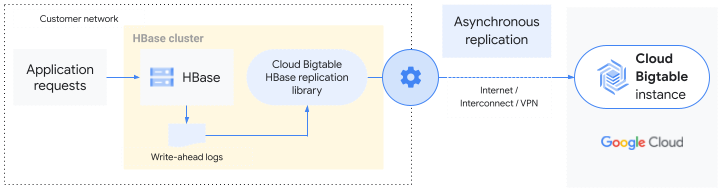
The Bigtable HBase replication library extends the base
[HBase replication](https://www.google.com/url?q=https://hbase.apache.org/book.html%23_cluster_replication&sa=D&source=docs&ust=1647884036317413&usg=AOvVaw2JmSun0VJ55n0dPqRQgydA)
service. Data that is written to an HBase cluster is replicated asynchronously
to a Bigtable instance in the same way that standard HBase
replication copies data to another HBase cluster. The library uses the
write-ahead log (WAL) of the source HBase cluster to push the mutations to the
Bigtable instance.
You can replicate an entire HBase cluster to Bigtable or
replicate only specific tables or column families. In other words, HBase
replication is enabled at the cluster, table, or column family level.
Replication from HBase to Bigtable is
[eventually consistent](https://en.wikipedia.org/wiki/Eventual_consistency).
## Migrate to Bigtable
The Bigtable HBase replication library lets you migrate to
Bigtable without pausing your application.
At a high level, the steps for online migration from HBase to
Bigtable are as follows. See the
[README](https://github.com/googleapis/java-bigtable-hbase/tree/main/hbase-migration-tools/bigtable-hbase-replication#readme)
for more details.
1. Before you begin, follow the [setup and configuration steps](https://docs.cloud.google.com/bigtable/docs/hbase-replication#set-up).
2. Enable replication on your HBase cluster.
3. Add a Bigtable replication endpoint as a [peer](https://docs.cloud.google.com/bigtable/docs/hbase-replication#add-peer).
4. Disable the Bigtable peer. This causes writes to HBase from that point onward to buffer on the HBase cluster.
5. Once the buffering has started to capture new writes, follow the [offline migration guide](https://docs.cloud.google.com/bigtable/docs/migrate-hbase-data-to-bigtable) to migrate a snapshot of your existing HBase data.
6. When the offline migration is complete, re-enable the Bigtable peer to let the buffer drain and replay writes on Bigtable.
7. After the buffer is drained, restart your application to send requests to Bigtable.
## Set up and configure the replication library
Before you can use the Bigtable HBase replication, you need to
complete the tasks in this section.
### Configure authentication
To ensure that the replication library has permission to write to
Bigtable, follow the steps at
[Create a service account](https://docs.cloud.google.com/iam/docs/service-accounts-create).
Assign the role
[roles/bigtable.user](https://docs.cloud.google.com/bigtable/docs/access-control#roles)
to the newly created service account.
Next, add the following to your `hbase-site.xml` file across the entire HBase
cluster.
google.bigtable.auth.json.keyfile
JSON_FILE_PATH
Service account JSON file to connect to Cloud Bigtable
Replace `JSON_FILE_PATH` with the path to the JSON file that
you downloaded.
For additional properties that you can set, see
[HBaseToCloudBigtableReplicationConfiguration](https://github.com/googleapis/java-bigtable-hbase/blob/main/hbase-migration-tools/bigtable-hbase-replication/bigtable-hbase-replication-core/src/main/java/com/google/cloud/bigtable/hbase/replication/configuration/HBaseToCloudBigtableReplicationConfiguration.java).
### Create a destination instance and tables
Before you can replicate from HBase to Bigtable,
[create a Bigtable instance](https://docs.cloud.google.com/bigtable/docs/creating-instance).
A Bigtable instance can have one cluster or multiple clusters
that operate in a multi-primary fashion. Requests from the HBase replication
service are routed to the closest cluster in the Bigtable
instance, then replicated to the other clusters in the instance.
> [!IMPORTANT]
> **Important:** To maintain the order of writes, connect to your Bigtable instance with an app profile that uses [single-cluster routing](https://docs.cloud.google.com/bigtable/docs/app-profiles#routing). Include the app profile ID as a config key in your [`hbase-site.xml`](https://docs.cloud.google.com/bigtable/docs/hbase-replication#set-config-properties). To learn more about connecting with an app profile, see [Create and configure app profiles](https://docs.cloud.google.com/bigtable/docs/configuring-app-profiles).
Your Bigtable destination table needs to have the same name
and same column families as your HBase table. For step-by-step instructions on
using the Bigtable Schema Translation tool to create a table with
the same schema as your HBase table, see
[Migrate data from HBase to Bigtable offline](https://docs.cloud.google.com/bigtable/docs/migrate-hbase-data-to-bigtable).
Even though you are replicating, rather than importing your data, the steps are
the same.
### Set the config properties
Add the following to your `hbase-site.xml` across the entire HBase cluster.
google.bigtable.project.id
PROJECT_ID
Bigtable project ID
google.bigtable.instance.id
INSTANCE_ID
Bigtable instance ID
google.bigtable.app_profile.id
APP_PROFILE_ID
Bigtable app profile ID
Replace the following:
- `PROJECT_ID`: The Google Cloud project that your Bigtable instance is in.
- `INSTANCE_ID`: The ID of the Bigtable instance that you are replicating your data to.
- `APP_PROFILE_ID`: The ID of the app profile to use to connect to Bigtable.
### Install the replication library
To use the Bigtable HBase replication library, you need to
install it on *every* server in the HBase cluster. Use the replication library
version that corresponds to your HBase version (1.x or 2.x).
#### Download the JAR
To get the replication library, run the following in the HBase shell.
wget BIGTABLE_HBASE_REPLICATION_URL
Replace `BIGTABLE_HBASE_REPLICATION_URL` with the URL of the
latest JAR with dependencies available in the replication library's Maven
repository. The filename is similar to
`https://repo1.maven.org/maven2/com/google/cloud/bigtable/bigtable-hbase-1.x-replication/1.0.0/bigtable-hbase-1.x-replication-1.0.0-jar-with-dependencies.jar`.
To find the URL or to manually download the JAR, do the following.
1. Go to the replication library repository for the version of HBase that you are using.
- [HBase 1.x](https://repo1.maven.org/maven2/com/google/cloud/bigtable/bigtable-hbase-1.x-replication/)
- [HBase 2.x](https://repo1.maven.org/maven2/com/google/cloud/bigtable/bigtable-hbase-2.x-replication/)
2. Click the most recent version number, such as `1.0.0`.
3. Identify the **jar-with-dependencies** file (usually at the top).
4. Either right-click and copy the URL, or click to download the file.
#### Install the JAR
On every HBase server, including the master and region servers, copy the file
that you just downloaded to a folder in the HBase classpath. For example,
you might copy the file to `/usr/lib/hbase/lib/`.
## Add a Bigtable peer
To replicate from HBase to Bigtable, you need to add a
Bigtable endpoint as a replication peer.
1. Restart the HBase servers to ensure that the replication library is loaded.
2. Run the following in the HBase shell.
add_peer "PEER_ID_NUMBER", ENDPOINT_CLASSNAME =>
'com.google.cloud.bigtable.hbaseHBASE_VERSION_NUMBER_x.replication.HbaseToCloudBigtableReplicationEndpoint'
Replace the following:
- `PEER_ID_NUMBER`: An integer ID for the
Bigtable replication peer. To enable HBase replication of only
select tables, use an [`add_peer` optional parameter](https://github.com/apache/hbase/blob/master/hbase-shell/src/main/ruby/shell/commands/add_peer.rb).
- `HBASE_VERSION_NUMBER`: The number of the HBase version that
you are using. Use `1` for HBase 1.x and `2` for HBase 2.x. (HBase 3.x is not
supported.)
## Enable table replication
After you add the Bigtable peer, enable table replication by
running the following command in the HBase shell for each table that you want
to replicate to Bigtable:
enable_table_replication TABLE_NAME
Replace `TABLE_NAME` with the name of the table to replicate.
## What's next
- [Review an overview of Bigtable's storage model, architecture, and features.](https://docs.cloud.google.com/bigtable/docs/overview)
- [Learn some of the differences between HBase and Bigtable](https://docs.cloud.google.com/bigtable/docs/hbase-differences).