# Private NAT
Private NAT enables private-to-private network address translation
(NAT).
## Specifications
Cloud NAT supports the following types of address translation
for Private NAT:
- From IPv4 to IPv4, or NAT44. For more
information, see [NAT44 in Private NAT](https://docs.cloud.google.com/nat/docs/private-nat#nat44).
- From IPv6 to IPv4, or NAT64. NAT64 is available for Compute Engine VM
instances. For Google Kubernetes Engine (GKE) nodes and serverless endpoints,
Cloud NAT
translates only IPv4 addresses. For more information, see
[NAT64 in Private NAT](https://docs.cloud.google.com/nat/docs/private-nat#nat64).
### General specifications
- Private NAT allows outbound connections and the inbound responses to those connections.
Each Cloud NAT gateway for Private NAT performs source NAT on egress traffic and
destination NAT for established response packets.
- Private NAT doesn't support auto mode Virtual Private Cloud (VPC) networks.
- Private NAT doesn't permit unsolicited inbound requests from connected networks, even if firewall
rules would otherwise permit those requests. For more information, see [Applicable RFCs](https://docs.cloud.google.com/nat/docs/private-nat#specs-pvt-nat-rfcs).
- Each Cloud NAT gateway for Private NAT is associated with a single VPC
network, region, and Cloud Router. The Cloud NAT gateway and
the Cloud Router provide a control plane---they aren't involved in
the data plane---so packets don't pass through the Cloud NAT gateway
or Cloud Router.
Even though a Cloud NAT gateway for Private NAT is
managed by a Cloud Router, Private NAT doesn't use or depend on the
Border Gateway Protocol.
- Private NAT doesn't support [endpoint-independent mapping (EIM)](https://tools.ietf.org/html/rfc5128).
- You cannot use Private NAT to translate a specific primary or secondary IP address range for a given subnet. A Cloud NAT gateway for Private NAT performs NAT on all IPv4 address ranges for a given subnet or list of subnets.
- After you create the subnet, you cannot increase or decrease the Private NAT subnet size. However, you can specify multiple Private NAT subnet ranges for a given gateway.
- Private NAT supports a maximum of 64,000 simultaneous connections per endpoint.
- Private NAT supports only TCP and UDP. ICMP and other protocols aren't supported.
- A virtual machine (VM) instance in a VPC network can only access destinations in a non-overlapping---not in an overlapping---subnetwork in a connected network.
- Private NAT doesn't support destinations in VPC networks that are connected through [VPC Network Peering](https://docs.cloud.google.com/vpc/docs/vpc-peering). For supported configurations, see [NAT44 in Private NAT](https://docs.cloud.google.com/nat/docs/private-nat#nat44) and [NAT64 in Private NAT](https://docs.cloud.google.com/nat/docs/private-nat#nat64).
### Routes and firewall rules
Private NAT uses the following
[routes](https://docs.cloud.google.com/vpc/docs/routes#types_of_routes).
| Route | NAT type | Description |
|---|---|---|
| - NCC subnet routes - NCC dynamic routes | NAT44 and NAT64 | For traffic between [VPC spokes](https://docs.cloud.google.com/network-connectivity/docs/network-connectivity-center/concepts/vpc-spokes-overview) of an NCC hub, the NAT gateway uses subnet routes. For NCC hubs that have both VPC spokes and [hybrid spokes](https://docs.cloud.google.com/network-connectivity/docs/network-connectivity-center/concepts/overview#hybrid_spokes), the NAT gateway uses subnet routes and dynamic routes. |
| Local dynamic routes | NAT44 and NAT64 | For Hybrid NAT, the NAT gateway uses dynamic routes that Cloud Router learns through Cloud Interconnect or Cloud VPN. |
| - Local subnet routes - Local static routes | NAT64 only | The NAT gateway uses these routes for traffic within the same VPC network. |
Routing considerations for NAT64:
- **Policy-based routes** : NAT64 doesn't use IPv4 and IPv6 policy-based routes. If NAT64 is enabled and the destination is in the `64:ff9b::/96` range, the following behavior occurs:
- The packet is translated to IPv4 and sent if it matches any of the applicable routes that are listed in the preceding table.
- NAT64 is performed even if the packet matches an IPv6 policy-based route.
- **Internet routes** : if the embedded destination IPv4 address matches a route that routes packets to the internet, NAT64 isn't performed. Use [NAT64 in Public NAT](https://docs.cloud.google.com/nat/docs/public-nat#nat64) for internet traffic.
Cloud NGFW firewall rules are applied directly to the network interfaces of
Compute Engine VMs, not Cloud NAT gateways for Private NAT.
When a Cloud NAT gateway for Private NAT provides NAT for a VM's network
interface, applicable egress firewall rules are evaluated as packets for that network interface
before NAT. Ingress firewall rules are evaluated after packets have been processed by NAT.
You don't need to create any firewall rules specifically for NAT.
### Subnet IP address range applicability
Private NAT provides NAT for IPv4 subnet ranges, IPv6
subnet ranges, or both:
- For IPv4 subnet ranges, you can use the following options
to configure NAT:
- **Primary and secondary IP address ranges of all subnets in the region.** A single Cloud NAT gateway gateway provides NAT for the primary internal IP addresses and all alias IP ranges of eligible VMs whose network interfaces use a subnet in the region.
- **Custom subnet list**: a single Cloud NAT gateway provides NAT for
the primary internal IP addresses and all alias IP ranges of eligible VMs whose network
interfaces use a subnet from a list of specified subnets.
- For IPv6 subnet ranges, you can use the following options
to configure NAT:
- **Internal and external IP address ranges of all subnets in the
region**: a single Cloud NAT gateway provides NAT for all internal and external IP address ranges in the region.
- **Custom subnet list**: a single Cloud NAT gateway provides NAT for the internal and external IP address ranges of eligible VMs whose network interfaces use a subnet from a list of specified subnets.
### Bandwidth
Using a Cloud NAT gateway for Private NAT doesn't change the amount of outbound or
inbound bandwidth that a VM can use. For bandwidth specifications, which vary by
machine type, see [Network bandwidth](https://docs.cloud.google.com/compute/docs/network-bandwidth) in the
Compute Engine documentation.
### VMs with multiple network interfaces
If you configure a VM to have [multiple network
interfaces](https://docs.cloud.google.com/vpc/docs/multiple-interfaces-concepts), the interfaces can be in the same VPC network or different
VPC networks.
Consider the following:
- For a VM that has multiple network interfaces in the same VPC network, a single Cloud NAT gateway for Private NAT applies to all interfaces in the VPC network.
- For a VM that has multiple network interfaces that are each in different VPC networks, a single Cloud NAT gateway for Private NAT can only apply to a single network interface of the VM. Separate Cloud NAT gateways for Private NAT can provide NAT to the same VM, where each gateway applies to a separate interface.
### NAT IP addresses and ports
When you create a Cloud NAT gateway for
Private NAT, you must specify a
subnet of purpose `PRIVATE_NAT`
from which NAT IP addresses are assigned for the VMs. For more information
about Private NAT
IP address assignment, see
[Private NAT IP addresses](https://docs.cloud.google.com/nat/docs/ports-and-addresses#pvt-nat-ip).
You can configure the number of source ports that each Cloud NAT gateway for Private NAT
reserves on each VM for which it is to provide NAT services. You can
configure [static port allocation](https://docs.cloud.google.com/nat/docs/ports-and-addresses#static-port),
where the same number of ports is reserved for each VM, or
[dynamic port
allocation](https://docs.cloud.google.com/nat/docs/ports-and-addresses#dynamic-port), where the number of reserved
ports can vary between the minimum and maximum limits that you specify.
The VMs for which NAT is to be provided are determined by the
[subnet IP
address ranges](https://docs.cloud.google.com/nat/docs/private-nat#specs-subnet-ranges) that the gateway is configured to serve.
For more information about ports, see [Ports](https://docs.cloud.google.com/nat/docs/ports-and-addresses#ports).
### Applicable RFCs
Private NAT is a port restricted cone NAT as defined in [RFC 3489](https://www.ietf.org/rfc/rfc3489.txt).
### NAT timeouts
Private NAT sets timeouts for protocol connections. For
information about these timeouts and their default values,
see [NAT timeouts](https://docs.cloud.google.com/nat/docs/tune-nat-configuration#nat-timeouts).
To guard against malicious IP address spoofing that targets idle TCP
connections,
[configure both the TCP keepalive inactivity period and keepalive interval](https://docs.cloud.google.com/compute/docs/troubleshooting/general-tips#idle-connections)
to be shorter than the smaller of the TCP Transitory
Connection Idle Timeout and TCP TIME_WAIT Timeout settings.
## NAT44 in Private NAT
Private NAT supports the following configuration options for
IPv4 traffic:
- [Private NAT for Network Connectivity Center spokes](https://docs.cloud.google.com/nat/docs/about-private-nat-for-ncc): enables private-to-private address translation for VPC networks that are connected to an NCC hub, which includes traffic between VPC spokes and between VPC spokes and hybrid spokes.
- [Hybrid NAT](https://docs.cloud.google.com/nat/docs/about-hybrid-nat): enables private-to-private address translation between a VPC network and an on-premises or another cloud provider network that is connected to Google Cloud by using Cloud Interconnect or Cloud VPN.
## NAT64 in Private NAT
NAT64 lets VM instances with IPv6-only network interfaces communicate with the
following IPv4 destinations:
- Destinations in the same VPC network
- Destinations in VPC networks that are connected to the same NCC hub as the source VPC network (VPC spokes)
- Destinations in on-premises or other cloud provider networks that are connected to the source VPC network through Cloud Interconnect, Cloud VPN, or NCC hybrid spokes
Enabling NAT64 applies translation to all these destinations.
The following example configuration shows NAT connections in the same
VPC network, to VPC spokes of an
NCC hub, and connections through
Cloud Interconnect.
[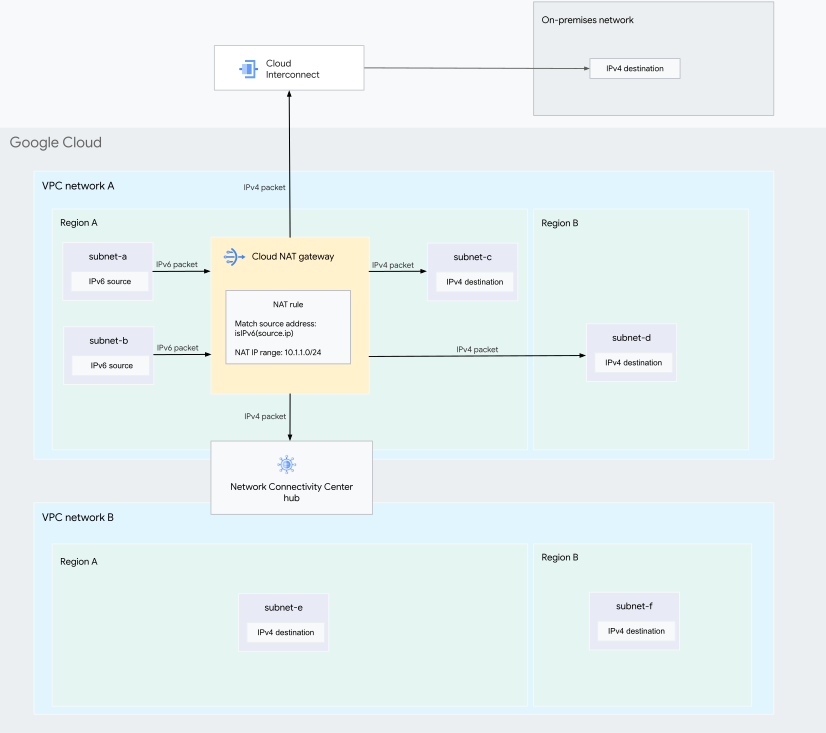](https://docs.cloud.google.com/static/nat/images/private-nat64.svg) NAT64 translation in Private NAT (click to enlarge).
In this configuration, a Cloud NAT gateway of
`type=PRIVATE` provides NAT64 for `subnet-a` and `subnet-b`. To
perform NAT64, the gateway replaces source IPv6 addresses and ports with
IPv4 addresses and ports from the subnet range that is assigned to the
gateway---in this example, `10.1.1.0/24`.
For more information, see [How it works](https://docs.cloud.google.com/nat/docs/private-nat#how-it-works).
### How it works
To use NAT64, destination addresses must be in the `64:ff9b::/96`
range. You can [configure DNS64](https://docs.cloud.google.com/dns/docs/configure-dns64) to automatically
synthesize IPv4-embedded IPv6 addresses by prepending this prefix to your
destination IPv4 addresses.
When an IPv6-only VM instance sends a request to a destination
in the `64:ff9b::/96` range and the request reaches the
Cloud NAT gateway with NAT64 enabled, the gateway performs NAT by
doing the following:
- Translating the source IPv6 address and port to one of the IPv4 addresses and ports from the subnet range that is allocated to the gateway.
- Translating the synthesized destination IPv6 address to the original IPv4
address by extracting the last 32 bits of the synthesized address.
The Cloud NAT gateway also uses the last 32 bits of the synthesized
IPv6 address to determine how the request packet is routed to the destination.
When an IPv6-only VM instance sends a packet to a destination in the
`64:ff9b::/96` range, the gateway applies the VPC
network's IPv4 routing table to the extracted IPv4 address.
If the IPv4 routing table has a supported route for that address, the
modified packet is sent to the destination.
When the response is received, the Cloud NAT gateway performs NAT by
doing the following:
- Prepending the `64:ff9b::/96` prefix to the source IP address of the response packet.
- Rewriting the response packet's destination address and destination port to the original address and port of the VM.
Before configuring NAT64, review
[Limitations](https://docs.cloud.google.com/nat/docs/private-nat#limitations)
and [Routes and firewall rules](https://docs.cloud.google.com/nat/docs/private-nat#specs-pvt-nat-routes-firewalls).
### Limitations
NAT64 has the following limitations:
- NAT64 is available only for IPv6-only
Compute Engine VM instances, for the following machine series:
- All second generation or earlier series
- M3 series
For more information, see
[Compute Engine terminology](https://docs.cloud.google.com/compute/docs/machine-resource#vm_terminology).
- IPv4 Private Service Connect endpoints in the same
VPC network as the Cloud NAT
gateway aren't reachable through NAT64.
## What's next
- [Set up and manage network address translation with Private NAT](https://docs.cloud.google.com/nat/docs/set-up-private-nat)
- Learn about [Cloud NAT product interactions](https://docs.cloud.google.com/nat/docs/nat-product-interactions)
- Learn about [IP addresses and ports](https://docs.cloud.google.com/nat/docs/ports-and-addresses)
- Learn about [Cloud NAT rules](https://docs.cloud.google.com/nat/docs/nat-rules-overview)
- [Troubleshoot configuration](https://docs.cloud.google.com/nat/docs/troubleshooting)