> [!NOTE]
> **Note:** The Vision API now supports offline **asynchronous batch image annotation** for all features. This asynchronous request supports up to 2000 image files and returns response JSON files that are stored in your Cloud Storage bucket. For more information about this feature, refer to [Offline batch image annotation](https://docs.cloud.google.com/vision/docs/batch).
The Vision API can detect and extract multiple objects in an
image with **Object Localization**.
Object localization identifies multiple objects in an image and
provides a [LocalizedObjectAnnotation](https://docs.cloud.google.com/vision/docs/reference/rest/v1p3beta1/images/annotate#LocalizedObjectAnnotation)
for each object in the image. Each `LocalizedObjectAnnotation` identifies
information about the object, the position of the object, and rectangular bounds
for the region of the image that contains the object.
Object localization identifies both significant and less-prominent objects in
an image.
Object information is returned in English only. The [Cloud Translation](https://docs.cloud.google.com/translate)
can translate English labels into various
[other languages](https://docs.cloud.google.com/translate/docs/languages).
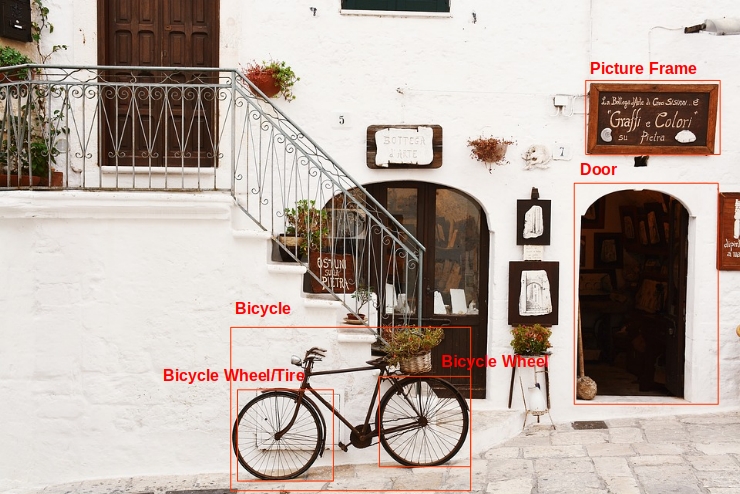 *Image credit:* [Bogdan Dada](https://unsplash.com/photos/J9cBJjlpYKU) on [Unsplash](https://unsplash.com/) (*annotations added*).
For example, the API returns the following information and bounding
location data for the objects in the preceding image:
| Name | mid | Score | Bounds |
|---|---|---|---|
| Bicycle wheel | /m/01bqk0 | 0.89648587 | (0.32076266, 0.78941387), (0.43812272, 0.78941387), (0.43812272, 0.97331065), (0.32076266, 0.97331065) |
| Bicycle | /m/0199g | 0.886761 | (0.312, 0.6616471), (0.638353, 0.6616471), (0.638353, 0.9705882), (0.312, 0.9705882) |
| Bicycle wheel | /m/01bqk0 | 0.6345275 | (0.5125398, 0.760708), (0.6256646, 0.760708), (0.6256646, 0.94601655), (0.5125398, 0.94601655) |
| Picture frame | /m/06z37_ | 0.6207608 | (0.79177403, 0.16160682), (0.97047985, 0.16160682), (0.97047985, 0.31348917), (0.79177403, 0.31348917) |
| Tire | /m/0h9mv | 0.55886006 | (0.32076266, 0.78941387), (0.43812272, 0.78941387), (0.43812272, 0.97331065), (0.32076266, 0.97331065) |
| Door | /m/02dgv | 0.5160098 | (0.77569866, 0.37104446), (0.9412425, 0.37104446), (0.9412425, 0.81507325), (0.77569866, 0.81507325) |
**mid** contains a machine-generated identifier (MID) corresponding to a label's
[Google Knowledge Graph](https://googleblog.blogspot.com/2012/05/introducing-knowledge-graph-things-not.html)
entry. For information on inspecting **mid** values, see the
[Google Knowledge Graph Search API](https://developers.google.com/knowledge-graph/)
documentation.
## Object Localization requests
### Set up your Google Cloud project and authentication
If you have not created a Google Cloud project, do so now. Expand this section for instructions.
### Detect objects in a local image
You can use the Vision API to perform feature detection on a local image file.
For REST requests, send the contents of the image file as a
[base64 encoded](https://docs.cloud.google.com/vision/docs/base64) string in the body of your request.
For `gcloud` and client library requests, specify the path to a local image in your
request.
> [!NOTE]
> **Note:** This feature returns results with `https://docs.cloud.google.com/vision/docs/reference/rest/v1/projects.locations.products.referenceImages#normalizedvertex` \[0,1\] and not real pixel values (`https://docs.cloud.google.com/vision/docs/reference/rest/v1/projects.locations.products.referenceImages#vertex`).
### REST
Before using any of the request data,
make the following replacements:
- BASE64_ENCODED_IMAGE: The base64 representation (ASCII string) of your binary image data. This string should look similar to the following string:
- `/9j/4QAYRXhpZgAA...9tAVx/zDQDlGxn//2Q==`
Visit the [base64 encode](https://docs.cloud.google.com/vision/docs/base64) topic for more information.
- RESULTS_INT: (Optional) An integer value of results to return. If you omit the `"maxResults"` field and its value, the API returns the default value of 10 results. This field does not apply to the following feature types: `TEXT_DETECTION`, `DOCUMENT_TEXT_DETECTION`, or `CROP_HINTS`.
- PROJECT_ID: Your Google Cloud project ID.
HTTP method and URL:
```
POST https://vision.googleapis.com/v1/images:annotate
```
Request JSON body:
```
{
"requests": [
{
"image": {
"content": "BASE64_ENCODED_IMAGE"
},
"features": [
{
"maxResults": RESULTS_INT,
"type": "OBJECT_LOCALIZATION"
},
]
}
]
}
```
To send your request, choose one of these options:
#### curl
> [!NOTE]
> **Note:** The following command assumes that you have logged in to the `gcloud` CLI with your user account by running [`gcloud init`](https://docs.cloud.google.com/sdk/gcloud/reference/init) or [`gcloud auth login`](https://docs.cloud.google.com/sdk/gcloud/reference/auth/login) , or by using [Cloud Shell](https://docs.cloud.google.com/shell/docs), which automatically logs you into the `gcloud` CLI . You can check the currently active account by running [`gcloud auth list`](https://docs.cloud.google.com/sdk/gcloud/reference/auth/list).
Save the request body in a file named `request.json`,
and execute the following command:
```
curl -X POST \
-H "Authorization: Bearer $(gcloud auth print-access-token)" \
-H "x-goog-user-project: PROJECT_ID" \
-H "Content-Type: application/json; charset=utf-8" \
-d @request.json \
"https://vision.googleapis.com/v1/images:annotate"
```
#### PowerShell
> [!NOTE]
> **Note:** The following command assumes that you have logged in to the `gcloud` CLI with your user account by running [`gcloud init`](https://docs.cloud.google.com/sdk/gcloud/reference/init) or [`gcloud auth login`](https://docs.cloud.google.com/sdk/gcloud/reference/auth/login) . You can check the currently active account by running [`gcloud auth list`](https://docs.cloud.google.com/sdk/gcloud/reference/auth/list).
Save the request body in a file named `request.json`,
and execute the following command:
```
$cred = gcloud auth print-access-token
$headers = @{ "Authorization" = "Bearer $cred"; "x-goog-user-project" = "PROJECT_ID" }
Invoke-WebRequest `
-Method POST `
-Headers $headers `
-ContentType: "application/json; charset=utf-8" `
-InFile request.json `
-Uri "https://vision.googleapis.com/v1/images:annotate" | Select-Object -Expand Content
```
If the request is successful, the server returns a `200 OK` HTTP status code and
the response in JSON format.
**Response:**
> [!NOTE]
> **Note: Zero coordinate values omitted.** When the API detects a coordinate ("x" or "y") value of 0, ***that coordinate is omitted in the JSON response*** . Thus, a response with a bounding poly around the entire image would be
> **\[{},{"x": 1},{"x": 1,"y": 1},{"y": 1}\]** . For more information, see the [API Reference documentation](https://cloud.google.com/vision/docs/reference/rest/v1/images/annotate#boundingpoly).
#### Response
```
{
"responses": [
{
"localizedObjectAnnotations": [
{
"mid": "/m/01bqk0",
"name": "Bicycle wheel",
"score": 0.89648587,
"boundingPoly": {
"normalizedVertices": [
{
"x": 0.32076266,
"y": 0.78941387
},
{
"x": 0.43812272,
"y": 0.78941387
},
{
"x": 0.43812272,
"y": 0.97331065
},
{
"x": 0.32076266,
"y": 0.97331065
}
]
}
},
{
"mid": "/m/0199g",
"name": "Bicycle",
"score": 0.886761,
"boundingPoly": {
"normalizedVertices": [
{
"x": 0.312,
"y": 0.6616471
},
{
"x": 0.638353,
"y": 0.6616471
},
{
"x": 0.638353,
"y": 0.9705882
},
{
"x": 0.312,
"y": 0.9705882
}
]
}
},
{
"mid": "/m/01bqk0",
"name": "Bicycle wheel",
"score": 0.6345275,
"boundingPoly": {
"normalizedVertices": [
{
"x": 0.5125398,
"y": 0.760708
},
{
"x": 0.6256646,
"y": 0.760708
},
{
"x": 0.6256646,
"y": 0.94601655
},
{
"x": 0.5125398,
"y": 0.94601655
}
]
}
},
{
"mid": "/m/06z37_",
"name": "Picture frame",
"score": 0.6207608,
"boundingPoly": {
"normalizedVertices": [
{
"x": 0.79177403,
"y": 0.16160682
},
{
"x": 0.97047985,
"y": 0.16160682
},
{
"x": 0.97047985,
"y": 0.31348917
},
{
"x": 0.79177403,
"y": 0.31348917
}
]
}
},
{
"mid": "/m/0h9mv",
"name": "Tire",
"score": 0.55886006,
"boundingPoly": {
"normalizedVertices": [
{
"x": 0.32076266,
"y": 0.78941387
},
{
"x": 0.43812272,
"y": 0.78941387
},
{
"x": 0.43812272,
"y": 0.97331065
},
{
"x": 0.32076266,
"y": 0.97331065
}
]
}
},
{
"mid": "/m/02dgv",
"name": "Door",
"score": 0.5160098,
"boundingPoly": {
"normalizedVertices": [
{
"x": 0.77569866,
"y": 0.37104446
},
{
"x": 0.9412425,
"y": 0.37104446
},
{
"x": 0.9412425,
"y": 0.81507325
},
{
"x": 0.77569866,
"y": 0.81507325
}
]
}
}
]
}
]
}
```
### Go
Before trying this sample, follow the Go setup instructions in the
[Vision quickstart using
client libraries](https://docs.cloud.google.com/vision/docs/quickstart-client-libraries).
For more information, see the
[Vision Go API
reference documentation](https://godoc.org/cloud.google.com/go/vision/apiv1).
To authenticate to Vision, set up Application Default Credentials.
For more information, see
[Set up authentication for a local development environment](https://docs.cloud.google.com/docs/authentication/set-up-adc-local-dev-environment).
// localizeObjects gets objects and bounding boxes from the Vision API for an image at the given file path.
func localizeObjects(w io.Writer, file string) error {
ctx := context.Background()
client, err := vision.NewImageAnnotatorClient(ctx)
if err != nil {
return err
}
f, err := os.Open(file)
if err != nil {
return err
}
defer f.Close()
image, err := vision.NewImageFromReader(f)
if err != nil {
return err
}
annotations, err := client.LocalizeObjects(ctx, image, nil)
if err != nil {
return err
}
if len(annotations) == 0 {
fmt.Fprintln(w, "No objects found.")
return nil
}
fmt.Fprintln(w, "Objects:")
for _, annotation := range annotations {
fmt.Fprintln(w, annotation.Name)
fmt.Fprintln(w, annotation.Score)
for _, v := range annotation.BoundingPoly.NormalizedVertices {
fmt.Fprintf(w, "(%f,%f)\n", v.X, v.Y)
}
}
return nil
}
### Java
Before trying this sample, follow the Java setup instructions in the
[Vision API Quickstart
Using Client Libraries](https://docs.cloud.google.com/vision/docs/detect-labels-image-client-libraries). For more information, see the
[Vision API Java reference documentation](https://cloud.google.com/java/docs/reference/google-cloud-vision/latest/overview).
> [!NOTE]
> **Note:** For Java **Spring framework** users, [Spring Cloud Google Cloud](https://docs.cloud.google.com/vision/docs/adding-spring) offers a way to automatically configure authentication settings and client objects to use Vision API.
/**
* Detects localized objects in the specified local image.
*
* @param filePath The path to the file to perform localized object detection on.
* @throws Exception on errors while closing the client.
* @throws IOException on Input/Output errors.
*/
public static void detectLocalizedObjects(String filePath) throws IOException {
List requests = new ArrayList<>();
ByteString imgBytes = ByteString.readFrom(new FileInputStream(filePath));
Image img = Image.newBuilder().setContent(imgBytes).build();
AnnotateImageRequest request =
AnnotateImageRequest.newBuilder()
.addFeatures(Feature.newBuilder().setType(Type.OBJECT_LOCALIZATION))
.setImage(img)
.build();
requests.add(request);
// Initialize client that will be used to send requests. This client only needs to be created
// once, and can be reused for multiple requests. After completing all of your requests, call
// the "close" method on the client to safely clean up any remaining background resources.
try (ImageAnnotatorClient client = ImageAnnotatorClient.create()) {
// Perform the request
BatchAnnotateImagesResponse response = client.batchAnnotateImages(requests);
List responses = response.getResponsesList();
// Display the results
for (AnnotateImageResponse res : responses) {
for (LocalizedObjectAnnotation entity : res.getLocalizedObjectAnnotationsList()) {
System.out.format("Object name: %s%n", entity.getName());
System.out.format("Confidence: %s%n", entity.getScore());
System.out.format("Normalized Vertices:%n");
entity
.getBoundingPoly()
.getNormalizedVerticesList()
.forEach(vertex -> System.out.format("- (%s, %s)%n", vertex.getX(), vertex.getY()));
}
}
}
}
### Node.js
Before trying this sample, follow the Node.js setup instructions in the
[Vision quickstart using
client libraries](https://docs.cloud.google.com/vision/docs/quickstart-client-libraries).
For more information, see the
[Vision Node.js API
reference documentation](https://googleapis.dev/nodejs/vision/latest).
To authenticate to Vision, set up Application Default Credentials.
For more information, see
[Set up authentication for a local development environment](https://docs.cloud.google.com/docs/authentication/set-up-adc-local-dev-environment).
// Imports the Google Cloud client libraries
const vision = require('https://docs.cloud.google.com/nodejs/docs/reference/vision/latest/overview.html');
const fs = require('fs');
// Creates a client
const client = new vision.https://docs.cloud.google.com/nodejs/docs/reference/vision/latest/overview.html();
/**
* TODO(developer): Uncomment the following line before running the sample.
*/
// const fileName = `/path/to/localImage.png`;
const request = {
image: {content: fs.readFileSync(fileName)},
};
const [result] = await client.objectLocalization(request);
const objects = result.localizedObjectAnnotations;
objects.forEach(object => {
console.log(`Name: ${object.name}`);
console.log(`Confidence: ${object.score}`);
const vertices = object.boundingPoly.normalizedVertices;
vertices.forEach(v => console.log(`x: ${v.x}, y:${v.y}`));
});
### Python
Before trying this sample, follow the Python setup instructions in the
[Vision quickstart using
client libraries](https://docs.cloud.google.com/vision/docs/quickstart-client-libraries).
For more information, see the
[Vision Python API
reference documentation](https://docs.cloud.google.com/python/docs/reference/vision/latest).
To authenticate to Vision, set up Application Default Credentials.
For more information, see
[Set up authentication for a local development environment](https://docs.cloud.google.com/docs/authentication/set-up-adc-local-dev-environment).
def localize_objects(path):
"""Localize objects in the local image.
Args:
path: The path to the local file.
"""
from google.cloud import vision
client = vision.https://docs.cloud.google.com/python/docs/reference/vision/latest/google.cloud.vision_v1.services.image_annotator.ImageAnnotatorClient.html()
with open(path, "rb") as image_file:
content = image_file.read()
image = vision.https://docs.cloud.google.com/python/docs/reference/vision/latest/google.cloud.vision_v1.types.Image.html(content=content)
objects = client.object_localization(image=image).localized_object_annotations
print(f"Number of objects found: {len(objects)}")
for object_ in objects:
print(f"\n{object_.name} (confidence: {object_.score})")
print("Normalized bounding polygon vertices: ")
for vertex in object_.bounding_poly.normalized_vertices:
print(f" - ({vertex.x}, {vertex.y})")
### Additional languages
**C#** :
Please follow the
[C# setup instructions](https://docs.cloud.google.com/vision/docs/libraries)
on the client libraries page
and then visit the
[Vision reference documentation for .NET.](https://googleapis.dev/dotnet/Google.Apis.Vision.v1/latest/api/Google.Apis.Vision.v1.html)
**PHP** :
Please follow the
[PHP setup instructions](https://docs.cloud.google.com/vision/docs/libraries)
on the client libraries page
and then visit the
[Vision reference documentation for PHP.](https://docs.cloud.google.com/php/docs/reference/cloud-vision/latest)
**Ruby** :
Please follow the
[Ruby setup instructions](https://docs.cloud.google.com/vision/docs/libraries)
on the client libraries page
and then visit the
[Vision reference documentation for Ruby.](https://googleapis.dev/ruby/google-cloud-vision/latest/Google/Cloud/Vision.html)
### Detect objects in a remote image
You can use the Vision API to perform feature detection on a remote image file that is located
in Cloud Storage or on the Web. To send a remote file request, specify the file's Web URL or
Cloud Storage URI in the request body.
> [!NOTE]
> **Note:** This feature returns results with `https://docs.cloud.google.com/vision/docs/reference/rest/v1/projects.locations.products.referenceImages#normalizedvertex` \[0,1\] and not real pixel values (`https://docs.cloud.google.com/vision/docs/reference/rest/v1/projects.locations.products.referenceImages#vertex`).
> [!CAUTION]
> **Caution:** When fetching images from HTTP/HTTPS URLs, Google cannot guarantee that the request will be completed. Your request might fail if the specified host denies the request (for example, due to request throttling or [DoS](https://en.wikipedia.org/wiki/Denial-of-service_attack) prevention), or if Google throttles requests to the site for abuse prevention. **As a best practice, don't
> depend on externally-hosted images for production applications**.
### REST
Before using any of the request data,
make the following replacements:
- CLOUD_STORAGE_IMAGE_URI: the path to a valid image file in a Cloud Storage bucket. You must at least have read privileges to the file. Example:
-
```restructuredtext
https://cloud.google.com/vision/docs/images/bicycle_example.png
```
- RESULTS_INT: (Optional) An integer value of results to return. If you omit the `"maxResults"` field and its value, the API returns the default value of 10 results. This field does not apply to the following feature types: `TEXT_DETECTION`, `DOCUMENT_TEXT_DETECTION`, or `CROP_HINTS`.
- PROJECT_ID: Your Google Cloud project ID.
HTTP method and URL:
```
POST https://vision.googleapis.com/v1/images:annotate
```
Request JSON body:
```
{
"requests": [
{
"image": {
"source": {
"imageUri": "CLOUD_STORAGE_IMAGE_URI"
}
},
"features": [
{
"maxResults": RESULTS_INT,
"type": "OBJECT_LOCALIZATION"
},
]
}
]
}
```
To send your request, choose one of these options:
#### curl
> [!NOTE]
> **Note:** The following command assumes that you have logged in to the `gcloud` CLI with your user account by running [`gcloud init`](https://docs.cloud.google.com/sdk/gcloud/reference/init) or [`gcloud auth login`](https://docs.cloud.google.com/sdk/gcloud/reference/auth/login) , or by using [Cloud Shell](https://docs.cloud.google.com/shell/docs), which automatically logs you into the `gcloud` CLI . You can check the currently active account by running [`gcloud auth list`](https://docs.cloud.google.com/sdk/gcloud/reference/auth/list).
Save the request body in a file named `request.json`,
and execute the following command:
```
curl -X POST \
-H "Authorization: Bearer $(gcloud auth print-access-token)" \
-H "x-goog-user-project: PROJECT_ID" \
-H "Content-Type: application/json; charset=utf-8" \
-d @request.json \
"https://vision.googleapis.com/v1/images:annotate"
```
#### PowerShell
> [!NOTE]
> **Note:** The following command assumes that you have logged in to the `gcloud` CLI with your user account by running [`gcloud init`](https://docs.cloud.google.com/sdk/gcloud/reference/init) or [`gcloud auth login`](https://docs.cloud.google.com/sdk/gcloud/reference/auth/login) . You can check the currently active account by running [`gcloud auth list`](https://docs.cloud.google.com/sdk/gcloud/reference/auth/list).
Save the request body in a file named `request.json`,
and execute the following command:
```
$cred = gcloud auth print-access-token
$headers = @{ "Authorization" = "Bearer $cred"; "x-goog-user-project" = "PROJECT_ID" }
Invoke-WebRequest `
-Method POST `
-Headers $headers `
-ContentType: "application/json; charset=utf-8" `
-InFile request.json `
-Uri "https://vision.googleapis.com/v1/images:annotate" | Select-Object -Expand Content
```
If the request is successful, the server returns a `200 OK` HTTP status code and
the response in JSON format.
**Response:**
> [!NOTE]
> **Note: Zero coordinate values omitted.** When the API detects a coordinate ("x" or "y") value of 0, ***that coordinate is omitted in the JSON response*** . Thus, a response with a bounding poly around the entire image would be
> **\[{},{"x": 1},{"x": 1,"y": 1},{"y": 1}\]** . For more information, see the [API Reference documentation](https://cloud.google.com/vision/docs/reference/rest/v1/images/annotate#boundingpoly).
#### Response
```
{
"responses": [
{
"localizedObjectAnnotations": [
{
"mid": "/m/01bqk0",
"name": "Bicycle wheel",
"score": 0.89648587,
"boundingPoly": {
"normalizedVertices": [
{
"x": 0.32076266,
"y": 0.78941387
},
{
"x": 0.43812272,
"y": 0.78941387
},
{
"x": 0.43812272,
"y": 0.97331065
},
{
"x": 0.32076266,
"y": 0.97331065
}
]
}
},
{
"mid": "/m/0199g",
"name": "Bicycle",
"score": 0.886761,
"boundingPoly": {
"normalizedVertices": [
{
"x": 0.312,
"y": 0.6616471
},
{
"x": 0.638353,
"y": 0.6616471
},
{
"x": 0.638353,
"y": 0.9705882
},
{
"x": 0.312,
"y": 0.9705882
}
]
}
},
{
"mid": "/m/01bqk0",
"name": "Bicycle wheel",
"score": 0.6345275,
"boundingPoly": {
"normalizedVertices": [
{
"x": 0.5125398,
"y": 0.760708
},
{
"x": 0.6256646,
"y": 0.760708
},
{
"x": 0.6256646,
"y": 0.94601655
},
{
"x": 0.5125398,
"y": 0.94601655
}
]
}
},
{
"mid": "/m/06z37_",
"name": "Picture frame",
"score": 0.6207608,
"boundingPoly": {
"normalizedVertices": [
{
"x": 0.79177403,
"y": 0.16160682
},
{
"x": 0.97047985,
"y": 0.16160682
},
{
"x": 0.97047985,
"y": 0.31348917
},
{
"x": 0.79177403,
"y": 0.31348917
}
]
}
},
{
"mid": "/m/0h9mv",
"name": "Tire",
"score": 0.55886006,
"boundingPoly": {
"normalizedVertices": [
{
"x": 0.32076266,
"y": 0.78941387
},
{
"x": 0.43812272,
"y": 0.78941387
},
{
"x": 0.43812272,
"y": 0.97331065
},
{
"x": 0.32076266,
"y": 0.97331065
}
]
}
},
{
"mid": "/m/02dgv",
"name": "Door",
"score": 0.5160098,
"boundingPoly": {
"normalizedVertices": [
{
"x": 0.77569866,
"y": 0.37104446
},
{
"x": 0.9412425,
"y": 0.37104446
},
{
"x": 0.9412425,
"y": 0.81507325
},
{
"x": 0.77569866,
"y": 0.81507325
}
]
}
}
]
}
]
}
```
### Go
Before trying this sample, follow the Go setup instructions in the
[Vision quickstart using
client libraries](https://docs.cloud.google.com/vision/docs/quickstart-client-libraries).
For more information, see the
[Vision Go API
reference documentation](https://godoc.org/cloud.google.com/go/vision/apiv1).
To authenticate to Vision, set up Application Default Credentials.
For more information, see
[Set up authentication for a local development environment](https://docs.cloud.google.com/docs/authentication/set-up-adc-local-dev-environment).
// localizeObjects gets objects and bounding boxes from the Vision API for an image at the given file path.
func localizeObjectsURI(w io.Writer, file string) error {
ctx := context.Background()
client, err := vision.NewImageAnnotatorClient(ctx)
if err != nil {
return err
}
image := vision.NewImageFromURI(file)
annotations, err := client.LocalizeObjects(ctx, image, nil)
if err != nil {
return err
}
if len(annotations) == 0 {
fmt.Fprintln(w, "No objects found.")
return nil
}
fmt.Fprintln(w, "Objects:")
for _, annotation := range annotations {
fmt.Fprintln(w, annotation.Name)
fmt.Fprintln(w, annotation.Score)
for _, v := range annotation.BoundingPoly.NormalizedVertices {
fmt.Fprintf(w, "(%f,%f)\n", v.X, v.Y)
}
}
return nil
}
### Java
Before trying this sample, follow the Java setup instructions in the
[Vision API Quickstart
Using Client Libraries](https://docs.cloud.google.com/vision/docs/detect-labels-image-client-libraries). For more information, see the
[Vision API Java reference documentation](https://cloud.google.com/java/docs/reference/google-cloud-vision/latest/overview).
> [!NOTE]
> **Note:** For Java **Spring framework** users, [Spring Cloud Google Cloud](https://docs.cloud.google.com/vision/docs/adding-spring) offers a way to automatically configure authentication settings and client objects to use Vision API.
/**
* Detects localized objects in a remote image on Google Cloud Storage.
*
* @param gcsPath The path to the remote file on Google Cloud Storage to detect localized objects
* on.
* @throws Exception on errors while closing the client.
* @throws IOException on Input/Output errors.
*/
public static void detectLocalizedObjectsGcs(String gcsPath) throws IOException {
List requests = new ArrayList<>();
ImageSource imgSource = ImageSource.newBuilder().setGcsImageUri(gcsPath).build();
Image img = Image.newBuilder().setSource(imgSource).build();
AnnotateImageRequest request =
AnnotateImageRequest.newBuilder()
.addFeatures(Feature.newBuilder().setType(Type.OBJECT_LOCALIZATION))
.setImage(img)
.build();
requests.add(request);
// Initialize client that will be used to send requests. This client only needs to be created
// once, and can be reused for multiple requests. After completing all of your requests, call
// the "close" method on the client to safely clean up any remaining background resources.
try (ImageAnnotatorClient client = ImageAnnotatorClient.create()) {
// Perform the request
BatchAnnotateImagesResponse response = client.batchAnnotateImages(requests);
List responses = response.getResponsesList();
client.close();
// Display the results
for (AnnotateImageResponse res : responses) {
for (LocalizedObjectAnnotation entity : res.getLocalizedObjectAnnotationsList()) {
System.out.format("Object name: %s%n", entity.getName());
System.out.format("Confidence: %s%n", entity.getScore());
System.out.format("Normalized Vertices:%n");
entity
.getBoundingPoly()
.getNormalizedVerticesList()
.forEach(vertex -> System.out.format("- (%s, %s)%n", vertex.getX(), vertex.getY()));
}
}
}
}
### Node.js
Before trying this sample, follow the Node.js setup instructions in the
[Vision quickstart using
client libraries](https://docs.cloud.google.com/vision/docs/quickstart-client-libraries).
For more information, see the
[Vision Node.js API
reference documentation](https://googleapis.dev/nodejs/vision/latest).
To authenticate to Vision, set up Application Default Credentials.
For more information, see
[Set up authentication for a local development environment](https://docs.cloud.google.com/docs/authentication/set-up-adc-local-dev-environment).
// Imports the Google Cloud client libraries
const vision = require('https://docs.cloud.google.com/nodejs/docs/reference/vision/latest/overview.html');
// Creates a client
const client = new vision.https://docs.cloud.google.com/nodejs/docs/reference/vision/latest/overview.html();
/**
* TODO(developer): Uncomment the following line before running the sample.
*/
// const gcsUri = `gs://bucket/bucketImage.png`;
const [result] = await client.objectLocalization(gcsUri);
const objects = result.localizedObjectAnnotations;
objects.forEach(object => {
console.log(`Name: ${object.name}`);
console.log(`Confidence: ${object.score}`);
const veritices = object.boundingPoly.normalizedVertices;
veritices.forEach(v => console.log(`x: ${v.x}, y:${v.y}`));
});
### Python
Before trying this sample, follow the Python setup instructions in the
[Vision quickstart using
client libraries](https://docs.cloud.google.com/vision/docs/quickstart-client-libraries).
For more information, see the
[Vision Python API
reference documentation](https://docs.cloud.google.com/python/docs/reference/vision/latest).
To authenticate to Vision, set up Application Default Credentials.
For more information, see
[Set up authentication for a local development environment](https://docs.cloud.google.com/docs/authentication/set-up-adc-local-dev-environment).
def localize_objects_uri(uri):
"""Localize objects in the image on Google Cloud Storage
Args:
uri: The path to the file in Google Cloud Storage (gs://...)
"""
from google.cloud import vision
client = vision.https://docs.cloud.google.com/python/docs/reference/vision/latest/google.cloud.vision_v1.services.image_annotator.ImageAnnotatorClient.html()
image = vision.https://docs.cloud.google.com/python/docs/reference/vision/latest/google.cloud.vision_v1.types.Image.html()
image.source.image_uri = uri
objects = client.object_localization(image=image).localized_object_annotations
print(f"Number of objects found: {len(objects)}")
for object_ in objects:
print(f"\n{object_.name} (confidence: {object_.score})")
print("Normalized bounding polygon vertices: ")
for vertex in object_.bounding_poly.normalized_vertices:
print(f" - ({vertex.x}, {vertex.y})")
### gcloud
To detect labels in an image, use the
[`gcloud ml vision detect-objects`](https://docs.cloud.google.com/sdk/gcloud/reference/ml/vision/detect-objects)
command as shown in the following example:
```
gcloud ml vision detect-objects https://cloud.google.com/vision/docs/images/bicycle_example.png
```
### Additional languages
**C#** :
Please follow the
[C# setup instructions](https://docs.cloud.google.com/vision/docs/libraries)
on the client libraries page
and then visit the
[Vision reference documentation for .NET.](https://googleapis.dev/dotnet/Google.Apis.Vision.v1/latest/api/Google.Apis.Vision.v1.html)
**PHP** :
Please follow the
[PHP setup instructions](https://docs.cloud.google.com/vision/docs/libraries)
on the client libraries page
and then visit the
[Vision reference documentation for PHP.](https://docs.cloud.google.com/php/docs/reference/cloud-vision/latest)
**Ruby** :
Please follow the
[Ruby setup instructions](https://docs.cloud.google.com/vision/docs/libraries)
on the client libraries page
and then visit the
[Vision reference documentation for Ruby.](https://googleapis.dev/ruby/google-cloud-vision/latest/Google/Cloud/Vision.html)
## Try the feature with the Google APIs Explorer
Try object detection and localization with the Google APIs Explorer. You can use the
image specified already (`https://cloud.google.com/vision/docs/images/bicycle_example.png`)
or specify your own image in its place. Send the request by selecting
**Execute**.
 *Image credit:* [Bogdan Dada](https://unsplash.com/photos/J9cBJjlpYKU) on [Unsplash](https://unsplash.com/).
**Request body:**
```
{
"requests": [
{
"features": [
{
"maxResults": 10,
"type": "OBJECT_LOCALIZATION"
}
],
"image": {
"source": {
"imageUri": "https://cloud.google.com/vision/docs/images/bicycle_example.png"
}
}
}
]
}
```
### Open the Google APIs Explorer and send the request
1. To open the Google APIs Explorer, click **Try it!**.
2. Optional. Modify the existing request body.
3. To send the request, click **Execute**.